Real inference on the visitor's device
From wrist IMU signals to activity records
Run the bundled 120-second synthetic example, or replace it with a compatible 100 Hz wrist-IMU recording. Nothing to install, and no sensor data is uploaded.
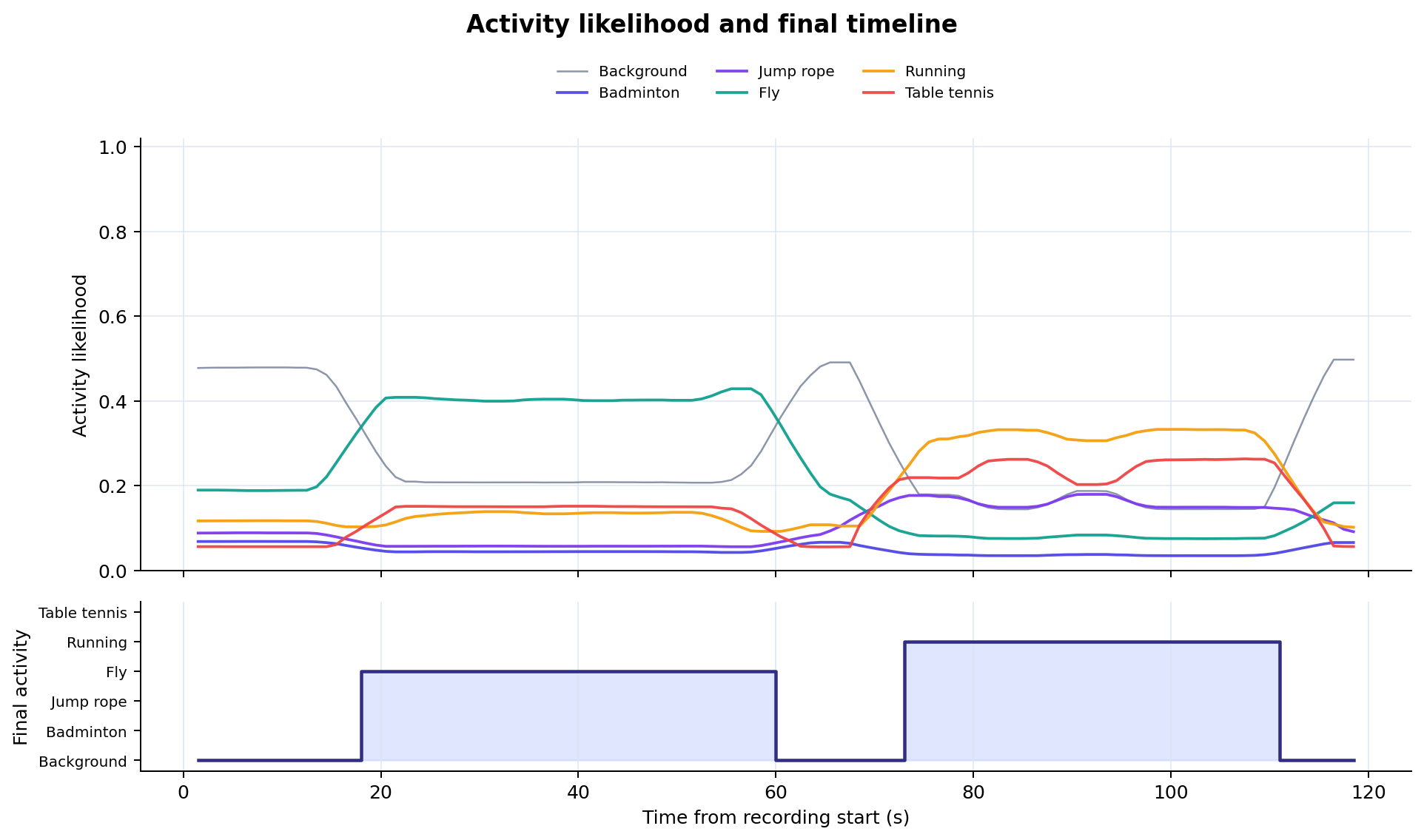 Bundled-example reference output
Run it here
The bundled example is ready. Keep the defaults and choose Run current recording to execute the complete three-scale pipeline on this device.
Local by design. The page downloads public, checksum-verified model files from Hugging Face. Your IMU samples are parsed, filtered, inferred, plotted, and exported inside a Web Worker on this device.
The chart is downsampled only for display. Model inference uses every validated sample.
The upper plot is the fused, smoothed posterior; the lower stepped trace is the Viterbi-decoded class index, matching the HF server figure.
Complete an inference run in three steps
Confirm the bundled example
synthetic_activity_imu.tsv is already loaded with 12,000 samples and 120 seconds of six-channel IMU data.
Keep the defaults
Start with local-boundary fusion, a 5-second minimum duration, 0.30 confidence, and Top-K 5.
Run and inspect
Choose Run current recording, then inspect raw signals, the likelihood timeline, and activity records.
After you choose Run
The Worker validates and zero-phase Butterworth-filters the recording, evaluates the real 3-, 5-, and 8-second ONNX models, then performs scale fusion, Viterbi decoding, boundary refinement, and record filtering.
Bundled-example reference output
With the defaults above, the public models produce 118 timeline points and two activity records. Use these values to confirm that the browser pipeline is operating correctly.
| Activity | Start (s) | End (s) | Duration (s) | Confidence |
|---|---|---|---|---|
| Fly | 29.84 | 73.15 | 43.31 | 0.4038 |
| Running | 76.06 | 98.24 | 22.18 | 0.3186 |
A pipeline demonstration, not an accuracy test
The bundled file is deterministically generated and contains no participant data. Its predicted classes and boundaries are model outputs, not ground-truth labels or accuracy evidence.
Read the three result tabs
Start with the three accelerometer and three gyroscope channels to check completeness, sampling stability, and visible movement.
The upper chart shows six smoothed class probabilities; the lower stepped trace shows the final class index after multi-scale fusion and Viterbi decoding.
Each row reports the activity, start, end, duration, and confidence and can be downloaded directly as CSV.
How parameters change the result
| Parameter | Default | Effect |
|---|---|---|
| Multi-scale fusion | local_boundary |
Combines the 3-, 5-, and 8-second posteriors, with the largest effect near activity transitions. |
| Minimum duration | 5 s |
Removes shorter intervals; larger values favor longer activities. |
| Confidence | 0.30 |
Removes weaker records; raising it may reduce both false positives and recall. |
| Top-K | 5 |
Limits the number of returned records; 0 keeps all records. |
These are Demo settings chosen to make the 120-second example easy to inspect, not immutable activity definitions from the paper experiments.
Upload your own recording
- Prepare a UTF-8, tab-separated
.txtor.tsvfile. - Choose or drop the file and keep the defaults for the first run.
- Inspect Raw signals before interpreting model output; change only one parameter at a time afterward.
Required column names:
ACC_TIME must contain strictly increasing millisecond timestamps with a median interval of 8–12 ms. Extra columns and invalid rows are ignored. The public Demo accepts 800–60,000 valid samples (about 8 seconds to 10 minutes at 100 Hz).
Local compute and privacy
The first run downloads about 17 MB of ONNX weights and a roughly 26 MB runtime. Files are SHA-256 verified and cached when browser storage is available.
Parsing, filtering, inference, plotting, and CSV export all run in a Web Worker on this device; the IMU recording is never uploaded.
Models are pinned to Hugging Face revision e0f89bb6…, with checksums published in model-assets.json. WebGPU is preferred when available; otherwise the Demo falls back to WASM CPU, so runtime varies across computers and phones.
Research output
A valid file format does not guarantee compatibility with the training protocol. Sensor placement, axis orientation, units, device characteristics, and preprocessing must match. Predictions are not medical, safety, or coaching advice.
For a server-side comparison, use the original Hugging Face Space. This page uses visitor compute and keeps the recording local.