On-device research demo
Android Demo
Install the public preview APK for WT9011DCL-BT50 BLE acquisition and on-device ONNX inference. No sensor is required for the offline path: download the synthetic IMU sample and select it in the app.
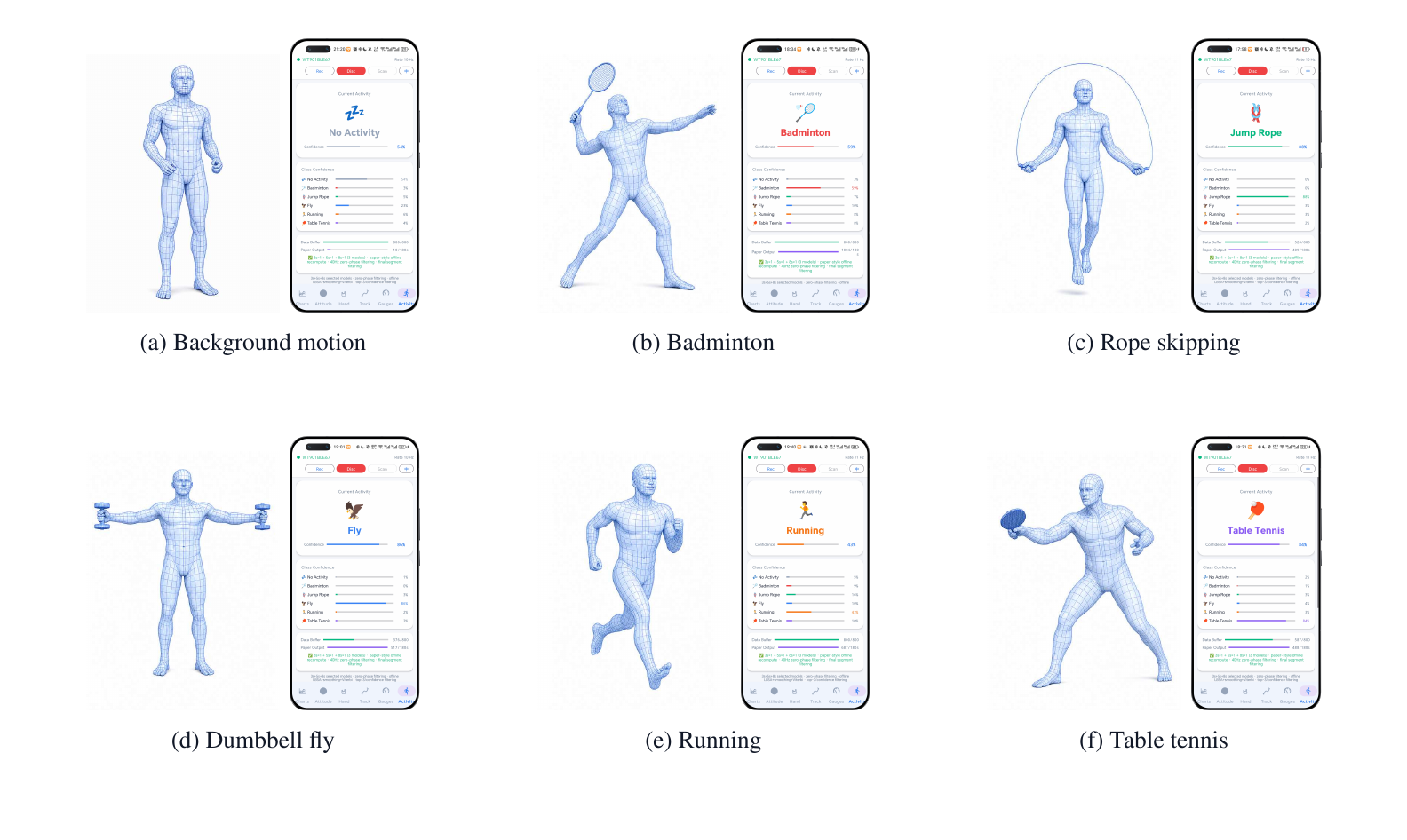 Field-tested prototype
Download and try
- Download and install the arm64-v8a APK.
- Download
synthetic_activity_imu.tsvto the phone. - Open Recognition, choose the downloaded file, and run offline inference.
The sample contains 12,000 computer-generated rows at 100 Hz and no participant
data. The file picker accepts the .tsv file directly.
Preview APK
This is a debug-signed research preview, not a Play Store production build.
Install only the APK linked above. Its SHA-256 is
cdde56db9d915eb10918724d503597a84fb18deace096086fe87509f60348be6.
Capabilities
| Area | Implemented behavior |
|---|---|
| Acquisition | Scan and connect to a WT9011DCL-BT50 over BLE |
| Visualization | Acceleration, angular velocity, attitude, compass, trajectory, hand-motion, and dashboard views |
| Recording | Save timestamped IMU CSV files to Android Downloads |
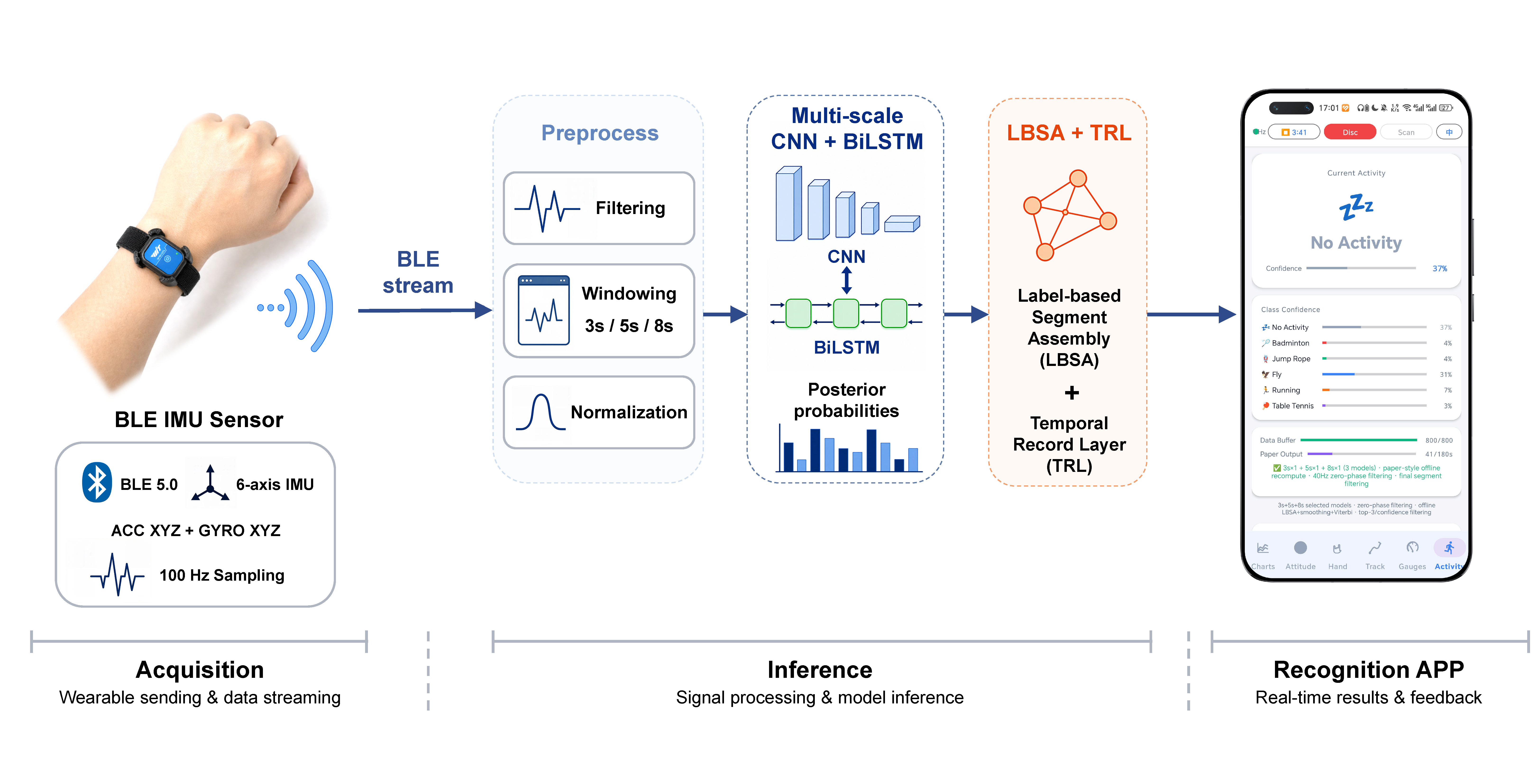
| Online inference | Run the selected 3 s / 5 s / 8 s ensemble on session history |
| Offline inference | Recognize the downloadable synthetic sample or a user-selected ACC/GYRO text file |
| Temporal logic | Filtering, LBSA fusion, smoothing, Viterbi decoding, boundary refinement, and segment filtering |
| Localization | Chinese and English UI strings |
Runtime
Requirements
- Android Studio, or JDK 17 with an Android SDK;
- Android Gradle Plugin 8.1.0 and the included Gradle 8.0 wrapper;
- an Android device with BLE support; and
- a WT9011DCL-BT50 sensor for live acquisition.
The offline recognition path can be explored without the physical sensor by copying a compatible derived segment text file to the phone.
Build
From the app directory:
The build downloads the four ONNX weights from the public HF Model repository and verifies their SHA-256 values. GitHub stores the app source and small JSON configuration, not the model binaries.
Android Studio creates local.properties automatically. Do not commit that
machine-specific file.
Sensor
- Install the debug APK on a BLE-capable Android device.
- Turn on the WT9011DCL-BT50 sensor.
- Grant the required Bluetooth and location permissions.
- Tap Scan, select a device whose name contains
WT, and connect. - Use bottom navigation to inspect charts, attitude, hand, trajectory, dashboard, and recognition views.
- Start recognition or record a CSV session.
Recorded files use names such as:
and are saved in the device Downloads directory.
Offline
On the recognition view, either:
- select the downloadable
synthetic_activity_imu.tsvsample; - choose a compatible paper-format ACC/GYRO
.txtfile; or - copy one of the derived files from
android_realtime_app/motion_segments/to the device and select it.
This exercises the app-side model and temporal layer without a live BLE connection.
Assets
| Asset | Role |
|---|---|
combined_model_3s_seed42.onnx |
Selected 3-second model |
combined_model_5s_seed123.onnx |
Selected 5-second model |
combined_model_8s_seed123.onnx |
Selected 8-second model |
norm_params_3s.json |
3-second normalization |
norm_params_5s.json |
5-second normalization |
norm_params_8s.json |
8-second normalization |
hand_motion.onnx |
Legacy fallback model |
norm_params.json |
Legacy fallback normalization |
The detailed model card contains input assumptions, output mapping, checksums, intended use, and known limitations.
Classes
| Index | Chinese | English |
|---|---|---|
| 0 | 无活动 | No activity |
| 1 | 羽毛球 | Badminton |
| 2 | 跳绳 | Jump rope |
| 3 | 飞鸟 | Fly |
| 4 | 跑步 | Running |
| 5 | 乒乓球 | Table tennis |
Research demonstration
The app and public models are intended for research, teaching, and reproducible prototype evaluation. They do not claim production safety, clinical validity, or cross-device generalization.
BLE tools
Optional utilities under android_realtime_app/tools/desktop/ provide:
collect.pyfor direct BLE collection and matplotlib plots;server.pyfor a FastAPI + WebSocket service; andindex.htmlfor a browser dashboard.
Hardware protocol details, UUIDs, packet parsing, unit conversion, and Android
mapping are documented in the app's docs/ directory.